

SECURE DOCUMENT BACKUP & ARCHIVING
Beyond Backup: Building a Recovery-Ready Document Archive
How AWS can help protect on-premises documents with immutable versions, malware screening, and measurable recovery controls.
Keeping a second copy of a file is not the same as being able to recover it.
Business-critical documents often live across file servers, departmental shares, and legacy applications. Traditional backups create copies, but those copies may still be exposed to compromised credentials, accidental deletion, or the same attack path as the source system.
A stronger approach protects historical versions, separates access, records security events, and tests whether files can actually be restored. AWS provides building blocks for this approach while allowing teams to retain familiar file-access workflows.
The problem is bigger than storage
- Recovery exposure. If production and backup copies share credentials or administrative boundaries, one incident can affect both.
- Inconsistent operations. Separate repositories and manual processes make retention, monitoring, and restore procedures difficult to enforce.
- Audit and governance requirements. Security and compliance teams need evidence of access, configuration changes, encryption, and retention.
This article presents a reference pattern for secure document backup and archiving not a complete application disaster recovery solution.
What changes with an AWS-based archive
The design adds a protected cloud repository behind the existing file environment. Four capabilities work together; none is sufficient on its own.
| Hybrid file access Amazon S3 File Gateway presents SMB or NFS shares and stores files as objects in Amazon S3. Local cache supports access and buffers transfers. | Protected versions S3 Versioning and S3 Object Lock retain designated object versions under a defined WORM retention policy. |
| Malware-aware intake GuardDuty Malware Protection for S3 scans supported new uploads; EventBridge can deliver scan outcomes to a custom response workflow. | Operational oversight IAM, AWS KMS, CloudTrail, CloudWatch, AWS Config, and Security Hub support access control, encryption, evidence, and visibility when configured. |
Why the distinction matters
S3 Object Lock protects specific object versions not the current filename shown in a file share. Users may still modify or delete a file through File Gateway, which creates a new version or a delete marker. The retained version remains protected for its retention period. Recovery therefore needs an explicit process to find and restore the correct version.
Malware scanning also requires an access decision. A scan result of “no threats found” is different from a scan that failed or could not run. Quarantine, notification, and promotion into a protected archive must be designed as workflow and access-policy controls; they are not automatic outcomes of enabling GuardDuty.
The design principle
Keep file transfer, screening, protected retention, and recovery access as distinct responsibilities. For higher-assurance environments, an incoming S3 location and a separately controlled archive destination can reduce the risk of distributing files before screening is complete.
How the architecture fits together
A typical hybrid deployment connects on-premises file shares to Amazon S3 through S3 File Gateway. Security, monitoring, and audit services provide supporting controls across the AWS environment.
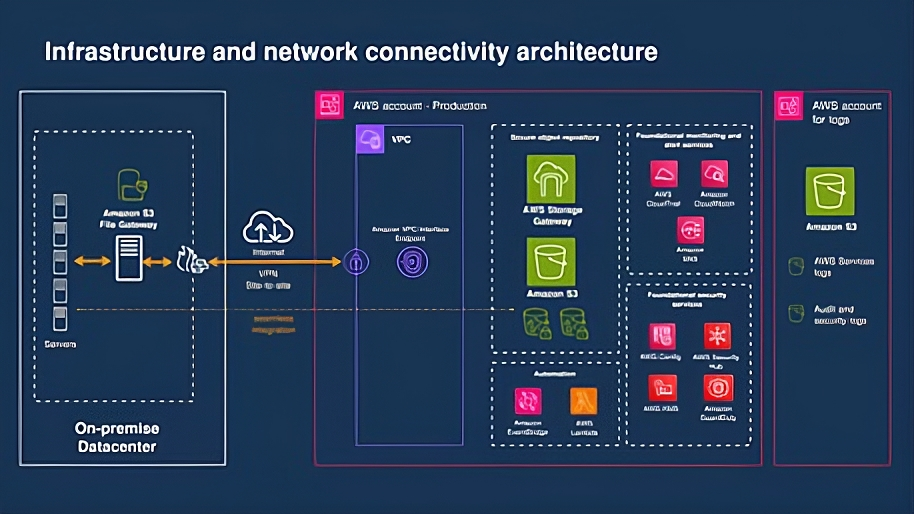
Figure 1. Reference architecture from the source material. Network, logging-account, IAM, retention, and malware-handling details should be validated for each deployment.
The document-to-recovery flow
- 1. File transfer. An on-premises client writes to the SMB/NFS share. File Gateway buffers writes locally and uploads objects to S3 asynchronously.
- 2. Retention. Versioning and Object Lock preserve selected object versions based on the configured retention policy.
- 3. Screening and response. GuardDuty scan results can trigger EventBridge workflows for alerts, access restrictions, or controlled promotion to an archive.
- 4. Recovery. Authorized operators select an appropriate clean version and test restoration into a controlled destination.
Where this pattern fits
Departmental repositories. Shared business documents that need controlled retention and occasional file-level recovery.
Long-term records. Contracts, reports, and operational documents governed by a known retention schedule.
Hybrid backup targets. File-based backup outputs that can be copied into an S3-backed repository and validated through restore tests.
Built for recoverability, not just retention
The operational value comes from combining protected storage with repeatable recovery practices. A well-designed implementation can help teams:
- Reduce exposure to ransomware. Retained object versions provide a recovery option even when a current file is encrypted or removed.
- Standardize retention. Policies can align archive periods to business and regulatory requirements, with lifecycle management where appropriate.
- Improve accountability. Logging, configuration monitoring, and controlled access provide clearer evidence for security reviews.
- Retain existing workflows. SMB/NFS access can help teams introduce cloud-backed storage without rebuilding every application.
What it does not replace
File Gateway is a file-to-object bridge, not a backup scheduler or an application-consistent backup engine. This pattern does not automatically protect databases, running workloads, or entire data centers. Those requirements need separate backup and disaster recovery designs, with defined recovery point and recovery time objectives (RPO/RTO).
Operational considerations
Cache capacity and network bandwidth affect how quickly data reaches S3. Retained versions, lifecycle choices, GuardDuty scanning, storage requests, and data recovery can also influence costs. Compliance-mode retention is difficult to reverse, so policies should be tested and approved before production enforcement.
From design to a restore-tested pilot
- Define the scope. Choose one repository, document retention needs, and agree on RPO/RTO and restore responsibilities.
- Implement the controls. Configure the gateway, encryption, least-privilege access, versioning, retention, logging, and scan-response workflow.
- Prove recovery. Test a completed upload, simulated file change or deletion, malware scan exceptions, and restoration of a known clean version.
The bottom line. A backup repository is valuable only when protected files can be found, trusted, and restored. AWS provides the storage and security capabilities; a successful solution also needs explicit retention decisions, a controlled operating model, and demonstrated recovery.
TMI helps organizations assess document repositories, design the right AWS architecture, and establish the security, monitoring, and recovery procedures required for day-to-day operation.
Further reading: S3 File Gateway | S3 Object Lock | GuardDuty Malware Protection for S3 | File Gateway + Object Lock