
Jumpy Hands
Building a Gesture-Controlled Serverless Game on AWS
How we built Jumpy Hands — a browser-based game controlled entirely by hand gestures — using MediaPipe, HTML5 Canvas, and a fully serverless AWS backend.
The Idea
We wanted to build something interactive for an AWS Summit booth — something that would catch people’s attention, get them to stop and play, and showcase the power of serverless AWS services in a tangible way.
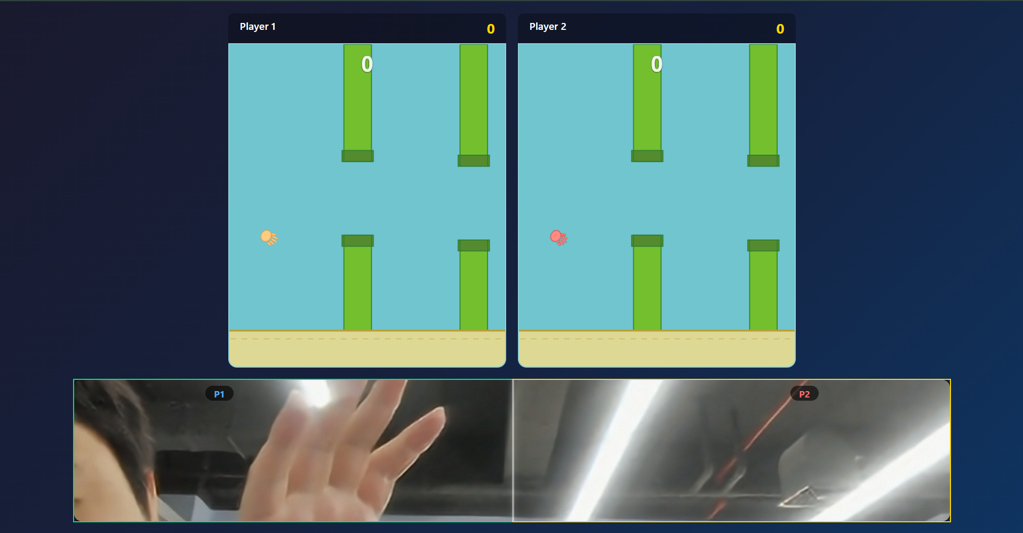
The result: **Jumpy Hands**, a Flappy Bird-style game where players use their webcam to control the game character with hand gestures. Open hand to glide, clench a fist to jump. No keyboard, no controller — just your hands.
How it works
Gesture detection
The core interaction relies on **MediaPipe Hands** by Google, running entirely in the browser. Here’s the detection pipeline:
1. The webcam feed is captured at 320×240 resolution (optimized for performance)
2. MediaPipe processes each frame and returns 21 hand landmarks per detected hand
3. Our gesture classifier analyzes the landmarks to determine: **open hand** or **closed fist**
The gesture detection logic is straightforward — we compare fingertip positions against the proximal interphalangeal (PIP) joint positions:
```javascript```
detectGesture(landmarks) {
    const fingerTips = [8, 12, 16, 20];
    const fingerPIPs = [6, 10, 14, 18];

    let curledFingers = 0;
    for (let i = 0; i < fingerTips.length; i++) {
        const tip = landmarks[fingerTips[i]];
        const pip = landmarks[fingerPIPs[i]];
        if (tip.y > pip.y) {
            curledFingers++;
        }
    }

    // Thumb check (different axis)
    const thumbTip = landmarks[4];
    const thumbIP = landmarks[3];
    const indexMCP = landmarks[5];
    if (Math.abs(thumbTip.x - indexMCP.x) < Math.abs(thumbIP.x - indexMCP.x)) {
        curledFingers++;
    }

    return (curledFingers / 5) >= 0.6 ? 'fist' : 'open';
}
If 60% or more of the fingers are curled, we classify it as a fist. The fist-to-open transition triggers a jump. This simple threshold approach proved reliable enough for a game setting.
Two-Player Mode
In two-player mode, both players share a single webcam. We detect up to two hands and assign them to players based on their horizontal position in the frame — left half belongs to Player 1, right half to Player 2. The webcam image is mirrored so it feels natural.
Both players get the same pipe sequence (using a seeded random number generator) to keep it fair:
```javascript```
// Simple seeded RNG (mulberry32)
createRNG(seed) {
    return function() {
        let t = seed += 0x6D2B79F5;
        t = Math.imul(t ^ t >>> 15, t | 1);
        t ^= t + Math.imul(t ^ t >>> 7, t | 61);
        return ((t ^ t >>> 14) >>> 0) / 4294967296;
    };
}
Game Rendering
The game itself is rendered on an HTML5 Canvas at 60fps. No game engine — just vanilla JavaScript with a standard game loop:
– Bird physics: gravity + velocity + delta-time normalization
– Pipe spawning: time-interval based, positions generated from the seeded RNG
– Collision detection: axis-aligned bounding box check against pipe gaps
– Visual feedback: the webcam border changes color (red = no hand, green = open, yellow = fist)
The Architecture

The entire backend is serverless. No EC2 instances, no containers — just event-driven functions that scale to zero when idle.
AWS Services Deep Dive
AWS Amplify — Frontend Hosting
The static frontend (HTML, CSS, JS, assets) is hosted on AWS Amplify. It auto-deploys on every git push to main — no manual build/deploy steps. Under the hood, Amplify provisions an S3 bucket and CloudFront CDN distribution, giving us HTTPS (required for webcam access) and global edge delivery.
Amazon API Gateway — REST API
Three endpoints exposed to the browser:
| Method | Path | Purpose |
| POST | /scores | Submit a game score |
| GET | /leaderboard | Fetch top scores |
| GET | /analytics | Get aggregate stats |
CORS is enabled for browser access, and each endpoint routes to a dedicated Lambda function.
AWS Lambda — Backend Logic
Six Lambda functions (Python 3.12, 256MB memory, 10s timeout):
– **SubmitScore** — Receives a score from the frontend and kicks off the Step Functions workflow
– **GetLeaderboard** — Queries DynamoDB’s Global Secondary Index for top scores, sorted descending
– **GetAnalytics** — Returns aggregate metrics (total games, averages, medians)
– **SaveScore** — Step Function task that persists the score to DynamoDB
– **CheckRanking** — Step Function task that determines if the score cracks the top 10
– **UpdateLeaderboard** — Step Function task that pushes the updated leaderboard to IoT Core
Amazon DynamoDB — Score Storage
Single table design with a partition key (`pk`) and sort key (`sk`). A Global Secondary Index on the `score` field enables efficient top-N queries without scanning.
```yaml```
BillingMode: PAY_PER_REQUEST
GlobalSecondaryIndexes:
  - IndexName: score-index
    KeySchema:
      - AttributeName: pk
        KeyType: HASH
      - AttributeName: score
        KeyType: RANGE
PAY_PER_REQUEST billing means we pay nothing when the game isn’t being played.
AWS Step Functions — Post-Game Orchestration
When a player finishes a game, the submission doesn’t just write to a database — it triggers a workflow:
```json```
SaveScore → CheckRanking → (if top 10?) → UpdateLeaderboard
This decouples the API response from the downstream processing. The player gets an immediate “score submitted” response, while Step Functions handles the rest asynchronously. If the score ranks in the top 10, the leaderboard update is pushed to all connected clients.
AWS IoT Core — Real-Time Leaderboard
IoT Core is used purely for its MQTT pub/sub messaging over WebSocket — no IoT “things” or rules involved.
– **Topic:** `flappy-bird/leaderboard`
– **Publisher:** The UpdateLeaderboard Lambda function
– **Subscribers:** Any browser client connected via MQTT over WebSocket
When a new high score lands, every connected browser instantly receives the updated leaderboard without polling.
Amazon Cognito — Authentication
The Identity Pool allows **unauthenticated (guest) identities** — players don’t need to sign up or log in. Cognito issues temporary IAM credentials scoped to:
– `iot:Connect` — establish WebSocket connection
– `iot:Subscribe` — subscribe to the leaderboard topic
– `iot:Receive` — receive messages
This keeps the experience frictionless while maintaining secure access to IoT Core.
Amazon QuickSight — Live Analytics (Optional)
For the Summit booth, we added a secondary display showing live game analytics powered by QuickSight with Amazon Q:
– Score distributions, top players, games over time
– Natural language queries: “Who has the highest score?” or “What’s the average score in two-player mode?”
QuickSight connects to the score data via an S3 export (triggered by DynamoDB Streams) with Athena as an intermediary for Direct Query mode.
Infrastructure as Code
The entire backend is defined in a single AWS SAM template (`template.yaml`). Deploying the full stack takes two commands:
```bash```
sam build
sam deploy
SAM outputs the API URL, Cognito IDs, and other values needed for the frontend config. The frontend just needs those values in `config.js` and it’s connected.
Performance Considerations
The GPU Problem
MediaPipe’s hand tracking model runs on WebGL and is computationally demanding. On laptops with weak integrated graphics, frame rates drop and gesture detection becomes laggy or unresponsive.
We mitigated this by:
– Running the webcam at 320×240 instead of higher resolutions
– Using `modelComplexity: 0` (fastest MediaPipe model)
– Lowering `minTrackingConfidence` to 0.3 to reduce re-detection frequency
– Yielding between inference frames (`setTimeout(resolve, 10)`) to let the game loop breathe
For hardware that still struggles, we built **Jumpy Hands Lite** — a separate build using TensorFlow.js Hand Pose Detection with the WebGL backend, which is lighter on GPU resources.
Delta-Time Normalization
The game loop uses delta-time normalization to maintain consistent physics regardless of frame rate:
```javascript```
const rawDelta = now - this.lastTime;
const delta = Math.min(rawDelta, 50) / 16.67; // 1.0 = 60fps

this.bird.velocity += GRAVITY * delta;
this.bird.y += this.bird.velocity * delta;
The `Math.min(rawDelta, 50)` clamp prevents the bird from teleporting if the tab was hidden or a frame took too long.
Cost
| Service | Monthly Cost |
| Amplify, Lambda, DynamoDB, API Gateway, Cognito, S3 | Free tier |
| IoT Core | ~$0.01 |
| QuickSight (Enterprise, 1 author) | ~$24 |
| **Total** | **~$24** |
Everything except QuickSight falls within AWS Free Tier for demo-level traffic. The architecture scales to zero — if nobody plays for a month, you pay almost nothing.
Lessons Learned
1. **MediaPipe is impressive but GPU-hungry.** Test on the weakest hardware your audience might have. At a booth, you control the hardware — but for a web game distributed broadly, GPU requirements are a real barrier.
2. **IoT Core is underrated for web real-time.** We initially considered AppSync or WebSocket API Gateway, but IoT Core’s MQTT pub/sub with Cognito credentials was simpler to implement and more cost-effective for one-directional pushes.
3. **Step Functions add clarity, not just orchestration.** The post-game workflow could have been a single Lambda, but breaking it into discrete steps made it trivial to debug, monitor, and extend later.
4. **Seeded RNG is essential for fairness.** In two-player mode, both players see identical pipe sequences. Without a shared seed, one player could get an easier run purely by chance.
5. **HTTPS is non-negotiable for webcam access.** Browsers block `getUserMedia()` on plain HTTP. Amplify handles this automatically, but it’s easy to forget during local development (`localhost` is the exception).